Showing posts with label GEF3D. Show all posts

Thursday, August 30, 2012

Modelitis, or, everything you always wanted to know about modeling

A couple of years ago I left the world of industrial software projects, and joined the academic world of computer science. I already had used models, I knew quite a few things about UML, even had programmed a graphical UML editor using GEF, in other words, I felt prepared to explore the universe of modeling. However, as my former boss and tutor Prof. Dr. Hans-Werner Six correctly diagnosed, I soon got infected with a terrible illness, widely spread in that area: modelitis. Actually, depending on how hard this disease hits you, you may call it meta-modelitis.

A special characteristic of this disease is that the patient himself is more or less unaware of it, actually, he or she often thinks it's great fun. So did I, and frankly, I doubt that I will ever be completely cured -- particularly since there are so many other victims of modelitis doing great and funny things. E.g.,  inventing one TLA (for non-modelitis afflicted readers: three letter acronym) after the other, such as MDA, MDD, DSL, MOF, ATL, EMF, ETL, GEF, GMF, OCL -- you name it. I was no better, I even tried certain variations, such as CAT, GEF3D, or Mitra (my own M2M-transformation language).

In the end, I wrote a book about my modelitis. It's title is

"Computerunterstützte Modelltransformationen. Modellierungstheorie, Konzeption und Visualisierung im Rahmen modellgetriebener Entwicklungsverfahren"

Yeah, it's a rather long title, and you can figure from its length that it's a real hard-core academic work (aka dissertation). Translated to english it's

"Computer-assisted transformations. Modeling theory, design and visualization in the context of model-driven development"

You may have noticed that "computer-assisted transformation" is abbreviated to CAT :-) This is the abstract of my thesis (in english, the thesis itself is written in german):

In the context of model driven development, fully automated model transformations are used to release developers from recurring and error-prone tasks, thus improving efficiency. However, these transformations cannot always be applied, or at least not without introducing new problems. By exploring semi-automated techniques, this work tries to eliminate some of these problems while preserving the positive effects. First, a modeling theory is developed for describing model driven approaches. This theory is used to analyze a typical problem of these approaches, the so called "semantic gap". The need to add semantics when transforming models is identified as a fundamental problem. Computer-assisted transformations are a semi-automated approach, which allow to combine manual transformation parts with automated parts. In order to define and execute this kind of transformations, a model-to-model transformation language called Mitra is designed. Due to the manual nature the approach, the models need to be visualized and a user- interface is to be provided. The basic idea of the proposed solution is the visualization of graphical models by means of two-dimensional diagrams projected onto planes in a three-dimensional scene. This permits not only the visualization of inter-model relations, but also semi-automated transformation of model elements with computer-assisted transformations employing the common drag-and-drop interaction pattern. With GEF3D, a framework is presented, which enables the combination of existing graphical editors in a three-dimensional scene. Three well-known transformation problems, among others the robustness analysis, are solved with the created tools in order to evaluate the proposed concepts.


If you are suffering modelitis as well, or if you are a otherwise seriously addicted to meta-modelling, you may download the PDF at the library of the FernUniversität in Hagen. If you want to look at some results, you may have a look at GEF3D, or at Mitra2. The latter is work in progress, as I'm currently migrating from Xtext 1.x to Xtext 2.x (the need for migrating from one version to another is one of the symptoms of modelitis, e.g., victims will enthusiastically tell you how they migrated their models from UML 1.x to UML 2.x ;-) ).

Since I doubt that too many of you will actually download and read the PDF, I will only repeat a snippet from my acknowledgement section:
 A big thank you to the Eclipse community! 
Without the great software, particularly in the modeling project, and without the great support (when I had problems with the great software ;-) ), I wouldn't had been able to actually implement software realizing my ideas and by that proof the concepts. And it wouldn't had been so much fun.

(All pictures taken from the dissertation)

Thursday, December 22, 2011

GEF3D goes Git, Maven/Tycho, and Hudson

or
Standing on the shoulders of giants

Abstract: Setting up a continuous integration build based on Git, Maven/Tycho, and Hudson is surprisingly easy. I assume that this is no real news for most readers. However, I ways very skeptical about that, especially because of all the project dependencies. So, this posting is meant for readers hesitating to set up an automatic build system because they think that it would be too complicated, just as I thought until .. well, until now.

One of the things on my todo list of 2011 was to set up a continuous integration build for GEF3D. I did set up such a system several years ago, using some XML files describing a module and its dependencies, and an XSL Transformation generating Ant scripts based on these module descriptions. In order to run nightly builds, cron was used -- yeah, good old times. I remember trying Maven back then, and I was so much disappointed that I wrote my own tools. Due to this experience, I had lots of respect setting up a build system for GEF3D.

In the beginning, Miles helped me to set up a Buckminster based build. He had some experience with this tool because his build system for the AMP project is based on Buckminster as well. Since Miles has switched to Git, he suggested the GEF3D project to switch as well. This would simplify the set up, as we only have to deal with one version control system. I filed a bug report for moving GEF3D from SVN to Git. Since I had read in the Git Migration guide that when moving to Git it would also be a good opportunity to refactor the structure of the project, we decided to introduce folders separating plugins, features, examples, and so on. Somehow my report got forgotten... As it was very complicated to configure the Buckminster build, and due to other things, I also didn't push it.

Migrate to Git

So, as the year is reaching its end, I decided to give it another try -- despite all these unknown tools such as Buckminster, Git, and Hudson. I started with Git. The first giants I have to give kudos to are the Eclipse Git guys, and Stefan, who wrote a nice blog posting about how he moved CDO to Git. The basic idea of Stefan's approach is really simple:
  1. Create a Git repository locally and use svn2git to migrate the code. Note that there exist different svn2git tools. I used https://github.com/nirvdrum/svn2git, while Stefan used https://github.com/schwern/svn2git.git! The import is a single command, in my case
    svn2git https://dev.eclipse.org/svnroot/technology/org.eclipse.gef3d --authors users.txt
    users.txt is a list of the committers, with username = prename surname <email>. Very simple, indeed. Since GEF3D is not that big, the migration requires only 10 minutes, and the created Git repository has a size about 9 MB.
  2. Then I refactored the project structure, simply done via command line: git mv is your friend here. (Kristian helped me with little problems, as I'm a Git rookie as well ;-) ).
  3. Commit all changes to the local Git repository, pack the ".git" repository, upload it to developer.eclipse.org and let the webmaster unpack it at git.eclipse.org.
Stefan had to do much more work, as he had to create four repositories by extracting things from the existing CDO project, which is much bigger than the GEF3D project, of course. You will find the GEF3D git repository at git://git.eclipse.org/gitroot/gef3d/org.eclipse.gef3d.git

Maven/Tycho

During my research about some Git questions, I stumbled over the GMF tooling project (well, I know that project for a long time, but I didn't cared about the "internal" structure). It uses the same project structure as the GEF3D team had decided to be used for GEF3D, and it uses Tycho. Although I had my (bad) experiences with Maven, I gave Tycho a try. And again, I was very much surprised at how easy it is to set up a complete build system with Maven/Tycho. I used the GMF tooling poms as a template, and after a couple of minutes (not hours!) I had a build system which could build most parts of GEF3D. Kudos to the Tycho giant team! Besides some special Eclipse packaging things, e.g., telling Maven how to handle an Eclipse plugin (and probably much more hidden under the hud), one really nice feature is the ability to use P2 repositories as Maven repositories. GEF3D has dependencies to GEF, GMF and EMF. To resolve these dependencies, I only had to define a single repository:
<repository>
    <id>Galileo</id>
    <layout>p2</layout>
    <url>http://download.eclipse.org/releases/galileo</url>
</repository>  
This is so cool!
Unfortunately, LWJGL (the OpenGL wrapper library used by GEF3D) does not provide a p2 repository, but an old style update site instead. That is, its update site provides only the site.xml file, and no p2 metadata. By accident, I'm the guy maintaining the LWJGL update site build script. It is an Ant based build, added to the overall LWJGL build system. Since LWJGL does not use Maven, and no Eclipse at all, I could not rely on the Tycho or p2 publisher to build the p2 metadata. In order to keep the overhead for the LWJGL project low, I wrote my own Ant task creating the missing p2 metadata for an old style update site. If you ever need something like this, the code of this Ant task is available from the LWJGL SVN -- it is a plain Java Ant task without any Eclipse dependencies. It can also be used standalone in order to create the content.xml/jar and artifact.xml/jar from a bunch of plugins, features, and a site.xml. At the moment, the official LWJGL update site is not updated yet and I'm using a personal mirror for GEF3D. But Brian, who maintaines the LWJGL update site, will probably update it soon.

Remark: The LWJGL update site provides the LWJGL plugin, which basically bundles LWJGL as an Eclipse plugin. Additionally, source and documentation bundles are provided, and a tool bundle with an information view (showing the OpenGL settings of your graphics card), and a library for easily configuring standalone LWJGL apps. And thank you very much, Brian, for maintaining the update site at lwjgl.org!

I also had to fight with Maven and Tycho to get the source and documentation bundles build (seems as if some tiny things were changed when Tycho moved to Eclipse, so you have to compare the settings in the documentation with actual poms). Thanks to Chris' Minerva project, and the GMF tooling project, I could solve these issues. The Minerva project also demonstrates how to configure tests (simple JUnit tests, and plugin tests with SWT bot) -- and it was easy to configure this for GEF3D as well. Although I'm still curious about Buckminster, I was really surprised how well Maven/Tycho works. And since it is already working, I won't switch to Buckminster. However, I could imagine that if you have special requirements, it would be easier to configure that with Buckminster. I'm currently tutoring a student setting up a Buckminster build system for a research project -- I'm looking forward to comparing the results.

Hudson

Eventually, I had to set up a Hudson job for the GEF3D build. Miles had already prepared that job, and I only had to configure GEF3D's git repository, and Maven. I tried this first on a locally installed Hudson ("installed" sounds like a lot of work, actually it is only downloading a war and start Hudson via java -jar hudson.war). Again, setting up a Hudson job for a Maven based build system is really easy. All you have to do is to specify your code repository (git in my case), and the parameters passed to Maven (which usually is "clean install"). That's it. Well, at the moment I have some problems building the javadoc API reference, as the Javadoc at hudson.eclipse.org apparently behaves a little bit different as the Javadoc on my local machine. But at the moment I can ignore that problem, and I'm sure this can be solved soon.

Summary

I was really surprised at how easy it was to migrate from SVN to Git, to set up a build system with Maven/Tycho, and to configure the job with Hudson. As a matter of fact it was that easy, that I probably will use Git, Maven/Tycho, and Hudson for new projects right from the start (I know, that's what all the agile guys tell you to do... but I didn't dare to actually do it). I was particularly surprised at how good Maven works with Eclipse thanks to Tycho -- the Tycho team did a really great job here! According to Leonard, there's a crack in everyting... and I'm a little bit nervous about configuring special requirements with Maven, such as integrating code transformation tools. I've found some blog posts about getting Xtext/Xtend work with Maven -- seems as if there are reasons to being nervous... but that's how the light comes in :-D

Wednesday, June 29, 2011

It's full of classes!

"The thing's hollow---it goes on forever---and---oh my God!---it's full of stars!" (Arthur C. Clarke: 2001. A Space Odyssey)

When I presented GEF3D in the past, people often ask me if it will scale, that is if a large number of items could be displayed. Well, the following screencast, inspired by Kubrick's great movie, shows a flight through the JDK. That is, every package of the 1.000 packages contained in the JDK is visualized as a plane in 3D space. On that plane, the classes are displayed---in total, more than 20.000 classes and interfaces are shown that way. Since the whole demo is a more or less a performance test, the classes are not really layouted yet. Also, only intra-package generalizations and implementations are shown yet.


The flight is sometimes a little bit bumpy. However, flying through 20.000 elements is more or less the worse case. Usually, the camera is moved in a specific area, and only sometimes a tracking shot may be used to "fly" to the next interesting area. As you will notice at the very beginning of the video, the camera is moving quite smoothly. Well, there is still room for improvement ;-)

Note that the video does not only demonstrate the overall performance of GEF3D, but also some of its features:
  • the whole flight through the package tube is a single GEF3D tracking shot
  • note the high quality font rendering
  • level-of-detail (LOD) techniques are implemented in two ways:
    • fonts are either rendered as texture or vector font, depending on the distance of the text to the camera
    • packages are painted empty, with only the name of the package, or with their content, depending on the distance to the camera. This kind of LOD technique is not part of GEF3D yet, but it can easily be added.
  • actually, you see 1.000 GEF editors, combined into a single 3D multi editor

Saturday, March 20, 2010

Quick test: GEF3D and e4 1.0 M4

Yesterday I posted my experiences of getting GEF3D running on e4 0.9. This is only a quick update for e4 1.0 M4. Remy Chi Jian Suen pointed me to e4 1.0 M4, and I followed the instruction on the Wiki page Remy linked to. Unfortunately, I did not succeed installing GMF with e4 1.0 M4 because there were always some unsatisfy dependencies errors. So I wasn't able to reproduce the NPE I described in the blog, and I wasn't able to test the Ecore Tools 3D example. I'm not personally using e4, so at the moment getting GEF3D running on e4 is not my first priority and I didn't investigate any further. Besides, I got a lot of exceptions in the e4 runtime, after restarting the runtime several times it didn't started at all. I get tons of "!MESSAGE unsupported:" messages, and when trying to create a new project with the context menu, the "new"-submenu is missing, finally I get another NPE:
java.lang.NullPointerException
 at org.eclipse.ui.internal.e4.compatibility.WorkbenchPage.getNewWizardShortcuts(WorkbenchPage.java:1172)
 at org.eclipse.ui.actions.BaseNewWizardMenu.addShortcuts(BaseNewWizardMenu.java:142)
 at org.eclipse.ui.actions.NewWizardMenu.addItems(NewWizardMenu.java:129)
 at org.eclipse.ui.actions.BaseNewWizardMenu.getContributionItems(BaseNewWizardMenu.java:205)
...
I don't know how but after switching the perspective I was able to create at least a simple project, and then the new-submenu was available enabling me to create a GEF3D graph example. So I got GEF3D to run with 1.0 M4 (proofed by screenshot ;-) ), however I found a severe problem with GEF 3.6 and I filed a bug report about that (# 306609). I had to fix that in order to get GEF3D running. Actually, this problem is a GEF3D blocker and I really hope the GEF team can solve that issue. As a matter of fact I'm glad to have found that bug now. I hope it's not too late for the final 3.6 version.
GEF3D on e4 1.0M4! Do you see the level-of-detail effect , i.e. labels on back planes are omitted! (Again kudos to Kristian ;-) )
Boris asked me to file a bug report, but frankly I don't know where to start... I could create a bug report about the NPE I described in my previous post, but I'd assume 0.9 is a little bit out-dated, isn't it?

Friday, March 19, 2010

Quick test: GEF3D and e4

Today I received an email from someone asking whether GEF3D will work with e4. Since GEF3D is "only" an extension of GEF (and GMF), I assumed it will work. In order to be sure, I tried it myself. This is my installation log: Step 1) Downloaded the e4 0.9 release (http://download.eclipse.org/e4/downloads/drops/R-0.9-200907291930/index.html#EclipseE4), in my case the Mac OS X Cocoa version Step 2) Installed the following features via the given update sites: Step 3) Imported GEF3D team project set found at http://eclipse.org/gef3d/resources/GEF3D.psf State: The 3D graph example is working, see screenshot.
GEF3D on e4! (Note the nice vector based fonts :-D Kudos to Kristian!)
Step 4) Now installed the missing features in order to test all examples: Restarted e4 after downloading these bundles. Ups, what's that? My toolbar has gone...? Where is it? However, I doubt GEF3D or GMF to be involved in that bug... Hmm... was there a toolbar before step 4)? Weird. UML2 Tools and Ecore Tools are working, at least the 2D versions. Unfortunately, the 3D versions are not working. There are not much error messages:
java.lang.NullPointerException
at org.eclipse.e4.extensions.LegacyPartRenderer.createEditor(LegacyPartRenderer.java:95)
at org.eclipse.e4.extensions.LegacyPartRenderer.createWidget(LegacyPartRenderer.java:357)
...
I didn't analyzed that error... without a toolbar, it's not very comfortable. Besides, I didn't found the code of LegacyPartRenderer and I didn't find a way to declare an exception breakpoint. Summary: Since the 3D graph example is working, I assume GEF3D and e4 should work in general (e4 does change the workbench, but not SWT or GEF). However, the 3D-fied UML2 and Ecore editors are not working, but I have no idea why they don't. Maybe it's not e4 but a problem with the latest GMF or ecore tools versions, I don't know. Frankly, I have ignored e4 for the time being (simply because I haven't had the time). IMHO you cannot simply install existing 3.x plugins and expect them to work with a 0.9 incubator framework. In so far I'm happy about the 3D graph example running! Besides, I assume my test only tested the legacy layer of e4, and not e4 itself. However, I'm still wondering why the 2D version of the ecore diagram editor is working and why the 3D version isn't. I'd assume there exist documents in the e4 project about how to solve problems like this.

Friday, April 17, 2009

First Steps Towards a Multi Editor 3D

Some days ago I 3d-fied the UML 2 Tools Diagram Editors. Well, a single 2D editor in 3D is funny but not really thrilling. You may ask: "Why should I use a 2D editor in 3D?" And I agree with you. The idea behind GEF3D is to enable multi model or multi diagram editing (this is why I started the GEF3D project). I strongly believe that "raising the level of abstraction" as promoted by all these model-driven approaches requires good tools. What does "good" mean in that context? Many models are edited graphically*, and using different levels of abstraction means using different models, that is diagrams. Also, using different (architectural) view points means using different models or diagrams. And all these models are somehow related! But these relationships usually aren't visualized. Too often, the best thing you get is a (EMF generated) tree editor. The GMF mapping editor is a typical example. IMHO a good tool would be a tool enabling graphical notations throughout the development process. And this is what GEF3D is all about. By 3d-fying existing GEF or GMF based editors, it is possible to reuse existing code and, from the user's perspective, existing and well-known graphical notations. This is also a principle of GEF3D: Enable exiting editors to be reused in 3D. Nobody wants to write new 3D-enabled editors when there are 2D editors already available, and no user wants to learn a new 3D-like notion of the UML. The next step is to open several 2D diagrams in a single 3D scene. Actually this is working for quite some time, an example application is published in [1]. This application was more a design study or proof of concept, I 3d-fied an elder version of the TOPCASED UML editor (which is GEF based). With the 3d-fied UML2 Tools editors, I was optimistic to create a UML Tools multi editor as well. Frankly, I was very much surprised how easy that was! The example code is part of the UML2 tools example found in the GEF3D SVN. I created a video demonstrating the multi editor. Have fun! (Sorry for the bad quality, it's my first video I uploaded to YouTube) Watch the video at YouTube A multi editor certainly is only the foundation for real-world (MDD) applications. Opening multiple editors in a single 3D scene enables the visualization of inter-model (or inter-diagram) relations such as transformation traces [1], inter-package dependencies, model-differences, manual mappings and so on. While the demo sounds promising, there are a lot of problems and known bugs I don't want to keep secret. There are some problems with feedback figures, text editing is not working as expected, there are problems with rotated planes (yes, actually the planes can be positioned every where in the 3D scene), currently it isn't possible to simply move an element from one diagram to another and so on. The example is only the first step, and we are working for solving the known issues.
[1]
J. v. Pilgrim and B. Vanhooff and I. Schulz-Gerlach and Y. Berbers: Constructing and Visualizing Transformation Chains. In: ECMDA-FA 2008, Berlin, Germany, June 9-13, Proceedings, LNCS 5095, pp 17--32, Springer-Verlag, 2008. URL: http://dx.doi.org/10.1007/978-3-540-69100-6_2

*For non-graphical models, XText is a wonderful tool. Combining text and graphical models certainly is a challenge for future research ;-)

Wednesday, April 8, 2009

You will be 3d-fied. Resistance is futile.

I admit it: I like Startrek. This is why I called a special pattern used to adopt editors for using them in a 3D scene with GEF3D "Borg-Factory-Pattern" (a borg factory modifies an object after it has been created by a "normal" factory using assimilators). Kristian Duske recently "3d-fied" the Ecore Diagram Editor---but he did not use the borg factory. So, why didn't we need the borg technology to assimilate this editor to be used in a 3D scene? The Ecore Diagram Editor is based on GMF. Frankly, I have lots of respect for GMF. I know GEF pretty well, but GMF with its thousands of new extension points, policies and stuff... it's like... like.. yeah, it's like a Borg cube. The good thing about that is that borg technology is already on board. We beamed Kristian on board of that cube, and he returned with a some nice providers enabling us to add 3D-behaviour to existing GMF editors. GEF3D needed some more examples anyway, so we 3d-fied the Ecore editor, and some of the UML editors of the UML Tools (which are also GMF-based), viz. the class, activity, and use case editors. The best thing: We only had to write a bunch of classes. For example, the 3D UML class editor plugin consists of 8 classes with only 212 statements (measured by c_count). The 3D versions of these editors are available from GEF3D's SVN repository (plugins org.eclipse.gefd.examples.uml and org.eclipse.gefd.examples.ecore). To give you an impression about what you need to 3d-fy an existing 3D GMF-based editor, here is a brief description on how we adopted the UML class editor (a tutorial about GEF3D is planned for June, since then don't hesitate to post your questions in the GEF3D newsgroup!):
  1. First, a new plugin is created, with a UMLDiagram3DPlugin activator, which is not really needed.
  2. A new editor class UMLDiagramEditor3D subclasses the original UMLDiagramEditor. Instead of a 2D viewer we have to instantiate a 3D viewer, actually, this need the most code since we have to copy and paste some code from the base classes.
  3. Only one editpart and figure have to be exchanged, that is the pair for the diagram, here the package. We have to provide new 3D versions for these two classes (PackageEditPart3D, DiagramFigure3D).
  4. The new edit part has to be created by a new factory UMLEditPartFactory3D, which subclasses the original UMLEditPartFactory
  5. This factory has to be injected into the editor somehow. This is done using a GMF provider UMLEditPartProvider3D. Since we only need this provider for our 3D editor, we have added a very dirty hack to identify which editor calls the provider. This is hack is really dirty (better not look at the provider ;-) ), and I hope to find a better solution.
  6. Finally we have to exchange the policy which creates the 2D feedback handles and replace it with a 3D version. Again, this is done by a provider called UMLEditPolicyProvider3D, the 3D policy is called Handles3DEditPolicy
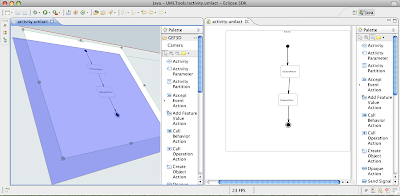
That's it. And what do you get for that? The result is an UML editor with the diagram projected on a plane in a 3D scene. You can use the camera to orbit and move around. Since it's derived from the original 2D UML editor, it is (more ore less) fully editable. Try to select classes and move them around, create new classes and so on. You can even open the very same UML model in the 3D editor and 2D editor simultaneously, changes are reflected in both editors automatically!
The 3D version of the UML Tool's activity diagram editor. The 3D version of the UML Tool's activity diagram editor (on the right hand side, 2D version on the left). Note the 3D handles and the transparent feedback figure!
Unfortunately there are some open issues which restrict the 3D editor: no edges can be drawn (sometimes, you can draw edges but don't see any feedback, sometimes the Eclipse IDE crashes when you try to do that). You cannot open more then one 3D editor at a time, we have a problem with the texture manager. And there are some other bugs... So many bugs? Yes, but only a very few lines of code to 3d-fy an editor. So, 3D-fy your editor and help us fixing the bugs! You may ask, huh, that's great, but why should I want to 3d-fy my editor? Well, I can think of many use cases: display multiple diagrams within one 3D scene and draw inter-diagram connections, annotate your diagrams with 3D elements (e.g. metrics drawn as 3D bars on top of classes), exchange some of your 2D figures and provide real 3D editors...

Tuesday, March 17, 2009

GEF3D goes X3D

Due to problems of getting LWJGL IP approved, we were wondering how to address this problem. We didn't want to fall into the same trap again, so we thought about how to reduce GEF3D's dependencies from a specific rendering library. The problem was not trivial at all, so I decided to give it to a student, Matthias Thiele. He should analyze GEF3D and its dependencies to the currently used rendering library LWJGL in the context of a bachelor thesis. The idea was to refactor GEF3D (i.e. Draw3D) in order to minimize dependencies and to create a generic renderer interface. Making renderers plugable leads to the idea of using renderers not only for drawing on the screen, but for exporting or printing, too. So besides the refactoring, a new renderer should be implemented... GEF provides several export formats, for example SVG for exchanging diagrams in a vector based file format. What SVG is for 2D diagrams, X3D is for 3D ones. So, besides the existing LWJGL-based renderer, Matthias implemented an X3D renderer. And Matthias did a great job! Based on his analysis of the GEF3D and Draw3D code, using cool tools like InferType (see intoJ project), we (that is Kristian, Matthias and myself) created a new design for Draw3D's rendering parts and we introduced an extension point to make renderers plugable! Matthias did most of the refactoring, actually before GEF3D was submitted to Eclipse. On the way we had to fix some bugs related to this (e.g. a 3D position problem or a dispose problem), but eventually it seems to work fine. Matthias wrote the X3D renderer, and he has contributed the code today. It is not available in the SVN yet, since we have to get it IP approved, first. Here you can see the result of the X3D export: The original GEF3D diagram is shown at the bottom left. The large diagram is the very same image, exported as X3D and viewed with the instantplayer. The small image on the top left shows the very same X3D file, this time rendered with the Octaga Player. The current version of the X3D exporter is only a beginning. We certainly have to improve the quality of the diagrams, but it shows what is possible. Maybe other programmers write other cool renderers for GEF3D in the future ;-)

Wednesday, January 14, 2009

GEF3D committed into SVN

After getting the preliminary approval I've just committed the initial GEF3D contribution into the SVN (GEF3D is participating in the parallel IP process). You can now check out GEF3D from svn://dev.eclipse.org/svnroot/technology/org.eclipse.gef3d In order to test GEF3D, you'll need the following projects (please add org.eclipse to the name): draw3d, draw3d.geometry, gef3d, gef3d.ext, gef3d.gmf, and gef3d.examples.graph Optionally you can check out the test and documentation projects, however there are currently not much tests and documentation available (but you can use the ant script in doc in order to generate the JavaDoc). Draw3D, the 3D version of Draw2D, needs a renderer module in order to produce any output. Currently, only LWJGL is supported (or.eclipse.draw3d.lwjgl). The module only contains the Draw3D specific code, additionally you will need the LWJGL libraries. These are available via the LWJGL update site at http://lwjgl.org/update. An description can be found at http://www.fernuni-hagen.de/se/personen/pilgrim/gef3d/lwjgl.html. The GEF3D example is running, but there is a known bug. We are working on that already... Actually there are more bugs known, we will add them to Bugzilla as soon as possible ;-) After checking out all these projects, the example editor can be activated by simply creating a file with appropriate extension: ".graphSample" for the 3D editor, ".graphSampleDia" for a 2.5D editor (i.e. 2D figures projected on 3D planes), and ".multiGraphSample" for a multi plane editor. Update: The current installation instruction can be found at http://wiki.eclipse.org/GEF3D.

Sunday, December 14, 2008

LWJGL Plugin at lwjgl.org

As you may now, GEF3D is moving to Eclipse. GEF3D uses OpenGL for rendering GEF diagrams in 3D, and since OpenGL is a C library, a Java wrapper library has to be used. LWJGL is such a library and GEF3D uses LWJGL. It works with SWT out of the box, that is there is no need for using the SWT-AWT-bridge, which isn't working on Mac OS X (maybe this will change with the new Cocoa version of SWT?). The latest version supports OpenGL 3.0 and runs on Mac, Windows, Linux and Solaris. Unfortunately, the LWJGL library didn't got IP approved. So it cannot be added to the Eclipse orbit project. The good news is, that lwjgl.org now provides an LWJGL Eclipse plugin! Brian Matzon has installed the update site today. Thank you so much, Brian! It is the plugin I wrote for GEF3D, and it is now available at http://lwjgl.org/update/. This plugin is interesting for people developing Eclipse plugins (or using GEF3D), since it simply wraps the LWJGL library (including the native code) into an Eclipse plugin. Not only the libraries are made available, but source code and documentation as well. Another plugin will be made available shortly at the same update site, providing LWJGL support for standalone Java applications developed with Eclipse. This plugin will define a new library "LWJGL Library", that is it resolves the jars, native libs, sources and JavaDoc using the LWJGL plugins above. Since the native libs will be defined as well, a standalone Java application can easily be started using Eclipse's "Run As - Java Application" without the need to set a library path. So, this plugin saves some mouse clicks and configuration problems. With these plugins, it is very easy for Eclipse developers to use OpenGL, either by an Eclipse plugin or by a standalone Java application developed with Eclipse.

Wednesday, November 5, 2008

The Eclipse gef3d project is complete!

Three and a half months ago Chris Aniszczyk asked me if I would like to make GEF3D an Eclipse project. At that time I had released a first version of GEF3D under the EPL. I started GEF3D as part of my Ph.D. project (which still is an ongoing project), but I thought that others may be interested in that framework, so I released it. I didn't knew what I did when I agreed on moving GEF3D to Eclipse. Oh guys, this paperwork and this whole Eclipse process is overwhelming. Fortunately I have two great mentors, Chris Aniszczyk and Ed Merks, helping me through all this just like Virgil guided Dante through all the nine circles of Hell. Thank you, guys! After writing the proposal, creating the creation review slides, filling out several requests and other paperwork, I received a mail today with this subject: "The Eclipse gef3d project is complete!". That's cool! So, in the near future you will find GEF3D at http://www.eclipse.org/gef3d. It will need some time to find code there, because the code has to get clearance first. So long, you will find GEF3D at it's old location at http://gef3d.org. Stay tuned!
PS: I thought I've read about Dante in Ed's Blog some time ago, I vaguely remember a slide on which he compared meta models (and meta meta models) with the circles of Hell, but I cannot find it anymore (I also remember his advice not to go there...). This was when Dante's trip to Hell came back into my mind. Actually I've never read the Divine Comedy. My girl friend once wrote a paper about Botticelli's Dante illustrations, and she made me love this special "comic strip" from the 15th century (and she explained me how to "read" it). I even had the luck to see the original drawings in Berlin once).